


Online Monitor (Last Seen)
2.7280.00 Reviews
App Specs
- Version
- 1.0.63
- Updated On
- License
- Free
- Downloads
- 1,000,000+
- Developer
- LAT Systems
- Categories
- Parenting
- Platform
- Android
Screenshots
 Analysis by AppCompare
I first-week curiosity is easy to understand with Online Monitor (Last Seen): it focuses on a question many parents already have, namely how much time their children spend online. I can see why a simple record of online activity might feel useful at first. The real test, though, is whether checking it becomes a steady, constructive habit rather than another source of worry.
Getting Started with Online Monitor
The first thing you'll notice about Online Monitor (Last Seen) is its straightforward setup. Installing the app is a breeze, and it doesn't take long before you’re diving into its features. The interface is clean and intuitive, which is always a plus in my book. No one wants to spend ages figuring out how to navigate an app, right?
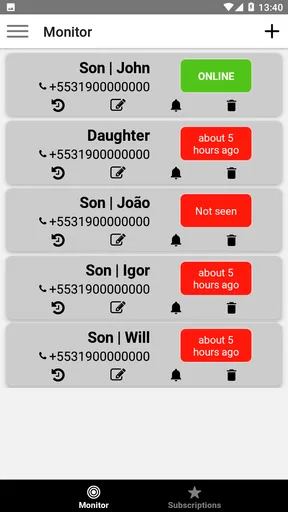
Once installed, you start by adding the contacts you wish to monitor. This is done directly from your phone’s contact list, making it super convenient. The app doesn’t require any complex configurations or permissions, which is something I really appreciate. In an age where privacy is a concern, it’s reassuring to know the app isn’t poking its nose where it shouldn’t.
What the activity record can—and cannot—tell you
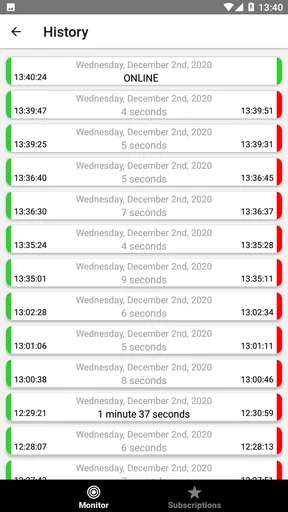
What sets this app apart from others is its capability to track online activity with precision. It doesn’t just tell you when someone was last online; it provides a detailed log. You can see how often and for how long someone was active, which is quite fascinating. Whether you’re a parent keeping an eye on your kids or someone just curious about a friend’s online habits, this feature is invaluable.
The app also offers notifications. Now, I’m not saying I’m a stalker, but knowing when someone comes online can be pretty handy! You can customize these alerts, so you’re only notified about the people you truly want to keep tabs on. Trust me, you don’t want your phone buzzing every few minutes with unnecessary notifications.
For a parent, the useful question is not simply whether a child appeared online at a particular moment. A pattern can be a prompt to ask what is happening: are messages interrupting homework, or is a child staying up later than agreed? I would treat the log as a conversation starter, not proof of what someone was doing. Online status alone cannot explain whether a person was chatting, reading, or briefly checking a message.
Useful routines for a family
A practical way to try the app is to agree in advance on what you are looking at and why. For instance, a parent and teenager might choose to review online habits together once a week, then decide whether bedtime or study boundaries need adjusting. That is less likely to turn monitoring into constant checking, and it gives the child a chance to explain a pattern rather than feel watched without context.
Worth Reading Before You Choose

Flipboard Shows What News Apps Must Do Beyond the Feed

Switching to Android Auto Means Rethinking Your Driving Routine

Google Calendar Makes a Crowded Week Easier to Manage

Ludo King Makes the Most of the Minutes Between Plans

Baby Panda World Brings Quick Play to Modern Phones, but Its Game Library Feels Busy

ESPN’s Live Game View Makes Following Close Games Easier
Notifications call for particular restraint. I would start with alerts only for the contacts that matter to the family’s agreed purpose, then turn off anything that encourages frequent checking without helping make a decision. If an alert arrives during school, work, or family time, it may be more distracting than useful. A log reviewed calmly later can be more actionable than a stream of moment-by-moment updates.
This is also where the app differs from the usual alternatives. Built-in parental controls and family safety tools generally focus on device use, schedules, or app access, while a last-seen monitor centers on online activity patterns. That narrow focus may help answer a specific question, but it is not a replacement for broader device controls or a direct conversation about internet habits. If your main need is setting limits on screen time, a parental-control tool designed for that job is likely a better fit.
Performance and Usability
Let’s talk about performance. I’ve used apps before that promise the moon and stars but deliver laggy and slow experiences. Thankfully, that’s not the case with this one. The app runs smoothly, updates in real-time, and doesn’t drain your battery. I found it to be reliable during my testing, with no noticeable glitches or crashes.
Usability-wise, it’s spot on. The design is minimalistic, ensuring that anyone, tech-savvy or not, can navigate it without a hitch. There’s a handy tutorial available for first-time users, but honestly, you might not even need it. It’s that user-friendly.
The habit that makes a monitoring app worthwhile is also the habit that keeps it from taking over: check for a reason, at a sensible interval, and decide what action would follow. If there is no likely next step—no family discussion, routine change, or concern to clarify—the log may not be adding much. Keeping that test in mind helps separate useful observation from collecting activity simply because it is available.
Where the trade-offs show up
While I’m a fan of the app, there are a couple of areas where it could improve. Firstly, it’s a bit limited in terms of platform compatibility. Currently, it’s more optimized for Android users. iOS folks might find a few features missing or not as well integrated. Hopefully, future updates will bridge this gap.
Moreover, while the app does a fantastic job at monitoring, it can sometimes feel a bit too intrusive. Having an option to anonymize certain features or provide more control over what’s shared and what’s not would be a great addition.
That concern is not just about interface preferences. Monitoring another person’s activity can affect trust, especially if the child is old enough to understand what the app is tracking. I would explain the purpose plainly and set boundaries around who reviews the information and how often. If the family cannot agree on those basics, this is probably not the right tool to introduce secretly or impulsively.
There is also a difference between a record that looks precise and a complete picture of someone’s day. Activity times can help identify a possible routine, but they do not reveal intent or explain every gap. I would avoid confronting a child over one unusual entry; first check whether there is a reasonable explanation, then talk about the broader pattern. That caution matters more than the apparent detail of a log.
LAT Systems offers this parenting app for free, with in-app purchases ranging from $3.99 to $54.99 per item. It is rated Everyone, and the Android release requires version 7.0 or later. The current version is 1.0.63. Those details make it easy to judge the basic fit, but I would still think about the family’s routine before installing: a tool that is opened only when a specific concern comes up may suit some households better than one that becomes a daily ritual.
Will it earn a place in the routine?
The app has reached over a million installs, but its average rating is 2.7 from around 36,000 ratings, alongside roughly 280 written reviews. I take that as a reason to keep expectations measured rather than assume that a straightforward idea will work equally well for every family. Its appeal is clearest when the goal is narrow and agreed upon; it is less convincing if you expect a complete account of a child’s digital life.
For a realistic example, imagine a parent who notices that a middle-schooler seems tired in the mornings. Instead of checking every alert, the parent could review activity patterns with the child, ask whether late-night messages are making it harder to sleep, and agree on a phone routine together. If the record does not support that concern, the family can move on rather than treating monitoring as a verdict. The value lies in guiding a conversation, not in replacing one.
Who should skip it? I would not choose it for a family that needs strong controls over apps, content, or device schedules, or for anyone who wants a full screen-time report. It is also a poor match for people who know that online-status notifications will make them anxious or lead to constant checking. In those cases, built-in device tools, a broader parental-control app, or a clear household agreement may be more useful and less intrusive.
The Final Word
All things considered, Online Monitor (Last Seen) is a solid choice for anyone interested in tracking online activity. It’s easy to use, reliable, and offers features that genuinely add value. Whether you’re a concerned parent, a busy professional, or just plain curious, this app has something for you.
The app is available for download on popular app stores, and if you’re like me, you’ll find it to be a handy tool in your digital arsenal. Just remember, with great power comes great responsibility—use it wisely!
My longer-term verdict is that it earns space only when the information leads to a calm, practical family decision. The first-week appeal is the quick sense of visibility; month to month, the value depends on using that visibility sparingly and openly. Its focused approach can suit parents who want to discuss online routines, but it will not replace broader safety controls or trust-building. I would try it with a clear purpose, review whether it is helping, and stop if the checking itself becomes the family’s new source of stress.
Pros
- Real-time updates on contact activity.
- Easy-to-navigate user interface.
- Customizable notification settings.
- Lightweight and fast loading times.
- Compatible with multiple devices.
Cons
- Limited to specific messaging platforms.
- May drain battery with frequent updates.
- Privacy concerns with tracking features.
- Subscription required for full access.
- Notifications can be overwhelming.
FAQs for Online Monitor (Last Seen)
What is Online Monitor (Last Seen) and how does it work?
Online Monitor (Last Seen) is an app designed to track and notify users about the online activity of specific contacts on messaging platforms. It works by monitoring the online status and sending notifications whenever the selected contact goes online or offline. This helps users keep track of activity without needing to be constantly logged into the messaging app.
Is Online Monitor (Last Seen) safe and secure to use?
Yes, the app is generally safe to use as it focuses on monitoring online status without accessing personal messages or data. However, users should always ensure they download it from a reputable source, such as Google Play or the Apple App Store, to avoid malicious versions. Regular updates should be installed to maintain security.
Does Online Monitor (Last Seen) drain the battery quickly?
Online Monitor (Last Seen) is designed to run efficiently in the background, minimizing battery consumption. However, like any app that continuously monitors activity, it may have a noticeable impact on battery life. Users can manage settings to reduce frequency of checks if they experience significant battery drain.
Can I monitor multiple contacts using Online Monitor (Last Seen)?
Yes, the app typically allows users to monitor multiple contacts simultaneously. The exact number may vary depending on the app’s version and any premium features. Users should check the app’s specifications or settings to determine how many contacts they can track at once without upgrading to a paid version.
Is there a subscription fee for using Online Monitor (Last Seen)?
Online Monitor (Last Seen) often offers both free and premium versions. The free version usually includes basic monitoring features, while the premium version provides additional functionalities like tracking more contacts, removing ads, or receiving more detailed reports. Subscription fees and features can vary, so users should review the pricing details within the app.


